
Housecall Pro: Field Service
Codefied Inc.Business
4.51.59K Reviews
- Version
- 2026.8.5
- Installs
- 500.00K
- Age Rating
- Everyone
Screenshots

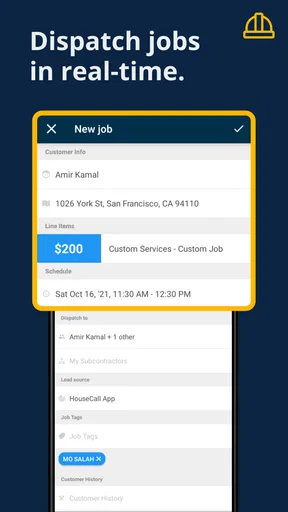
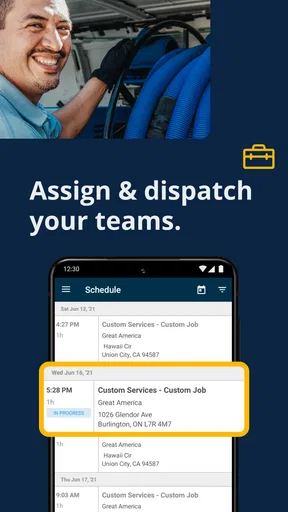
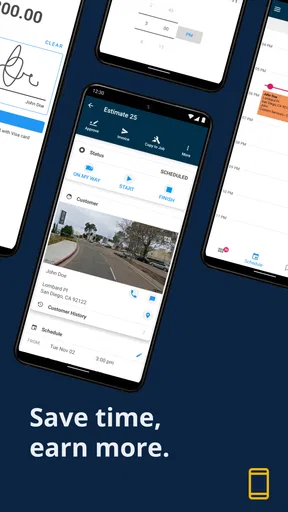
Our Review of Housecall Pro: Field Service
 Analysis by Appyee
Running a field service business usually means balancing far more than the work happening at a customer’s property. I also need to keep estimates organized, find the right appointment slot, send the technician the useful details, and make sure the invoice does not get forgotten afterward. Housecall Pro: Field Service is built around that complete journey rather than one isolated task. After using it as a business app, I see its main appeal in bringing those steps into one workspace for service professionals.
This is a free business app from Codefied Inc., rated for Everyone, and it has grown to more than 500 thousand installs. Its average rating is 4.5 from around 6.7 thousand ratings, which suggests that many users find the overall workflow worthwhile. The current version is 2026.8.5, and it runs on operating systems from version 9 onward. Those details matter less than the practical question: does it reduce the daily juggling involved in running a field team?
How I decide whether Housecall Pro fits a service business
I judge Housecall Pro by whether it makes the handoffs in a service business clearer, not simply by how many tasks it can hold. Before adopting it, I’d map one typical job from the first customer conversation to billing and note where details currently get lost or entered twice. That gives me a practical way to decide whether a connected workflow will solve a real problem.
The real test is the whole customer journey
I would not choose this app simply because it can create an estimate or place an appointment on a calendar. Plenty of individual tools can handle one of those jobs. The more important test is whether a business can move from a customer request to completed work and payment without repeatedly copying information between unrelated apps.
That makes Housecall Pro particularly relevant to businesses such as plumbing, electrical, heating and cooling, cleaning, landscaping, repair, and other mobile services. The exact trade is less important than the working pattern: people leave a base, visit customers, perform a job, and need the office to know what is happening. If your business depends on that movement, an all-in-one workflow can be more useful than a collection of disconnected specialist tools.
I also look at how much structure an app imposes. A solo operator may want speed and minimal administration, while a growing company needs consistent handoffs between office staff and technicians. The right choice depends on whether the app supports the way the business already works or forces everyone into an awkward routine.
What I would prepare before moving over
Switching to a field service platform is not just a download. Before committing, I would gather customer records, service addresses, open estimates, upcoming appointments, invoice details, and the wording used for common jobs. Even when an app makes daily work easier, a messy starting point can make the first few weeks feel harder than the old system.
I would also decide who owns each step. For example, the office might create and schedule work, while a technician updates the job from the road and the owner checks invoices later. That simple division prevents a common problem with business apps: everyone can access the same information, but nobody knows who is responsible for keeping it current.
My strongest advice is to begin with a small, repeatable workflow instead of trying to redesign the entire company on the first day. Pick one service type, create a sample estimate, schedule a test visit, follow the job through dispatch, and finish with an invoice. This exposes confusing steps before they affect a real customer.
How the main workflow feels in practice
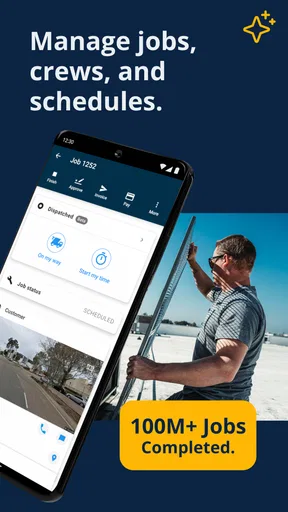
The app’s central promise is easy to understand: estimate, schedule, dispatch, and invoice from one place. In practical terms, that means I can think of a job as a continuing record rather than four separate administrative tasks. The estimate starts the conversation, the schedule gives the work a time, dispatch connects it to the person doing it, and invoicing closes the loop.
That continuity is valuable because field work changes during the day. A customer may approve a job after an initial conversation, an appointment may need to move, or the person handling the visit may need the latest details before leaving the office. Keeping those stages connected reduces the chance that the office is working from one version of the job while the technician is working from another.
I especially like this approach for businesses that have outgrown text messages, paper notes, and a shared calendar. Those methods can work for a very small operation, but they become fragile when several jobs overlap. A dedicated workflow gives the team a clearer place to look when someone asks what was quoted, when the visit is planned, or whether billing has been completed.
Where it saves time, and where it asks for discipline
The biggest time saving is not necessarily one dramatic button. It comes from reducing repeated entry. If the same customer and job details remain attached to the work as it moves through the process, I spend less time rewriting names, addresses, and descriptions. That also makes the customer history more useful because the record reflects the path from request to payment.
There is a trade-off, though. An all-in-one system only stays helpful when staff actually update it. If a technician finishes a visit but leaves the job status untouched, the office still has to chase the information manually. Housecall Pro can organize the process, but it cannot replace clear habits. A business that refuses to maintain digital records may find a simpler calendar and accounting routine less frustrating.
Another practical consideration is the learning curve. A basic calendar feels immediately familiar because it does very little. A field service app has more concepts to understand: customers, jobs, schedules, assignments, estimates, and invoices. That extra structure pays off when the business is busy, but it can feel like unnecessary administration for someone who handles only a few recurring appointments.
A realistic day for a small service team
Imagine a small repair company beginning the morning with several customer requests. The office can prepare estimates for the jobs that need approval, place accepted work into the schedule, and dispatch the visits to the available technicians. When one appointment takes longer than expected, the office has a central place to adjust the plan instead of relying on a chain of separate calls and messages.
At the property, the technician benefits from having the job connected to the wider record. The important point is not simply seeing a task on a screen; it is knowing that the visit belongs to a customer, an address, an estimate, and a billing step. After the work is finished, the office can continue from the same job rather than reconstructing the day from handwritten notes.
That scenario also shows the app’s limitation. If the company has no agreed process for recording changes, the shared system can become incomplete. A technician who makes an informal promise to a customer without updating the job creates the same confusion that existed before the app was installed. The software helps most when the business treats it as the official record.
Useful habits that are easy to overlook
One useful habit is to treat estimates as a communication checkpoint, not merely a price document. Before scheduling work, I would make sure the job description is understandable to both the customer and the person assigned to it. Clear wording reduces the chance that a technician arrives expecting one task while the customer expects another.
A second habit is to review the schedule from the office perspective before the day begins. Dispatching is not only about filling empty spaces. It is also about checking whether the assigned person has enough context, whether appointments are grouped sensibly, and whether the day contains too many promises to customers. The app’s value increases when scheduling is used for planning rather than simple appointment storage.
A third insight is to close the administrative loop immediately after a visit. Delaying invoicing may feel harmless when the team is busy, but unfinished jobs quickly become difficult to remember. Making completion and billing part of the same routine gives the business a clearer view of what has actually been earned and what still needs attention.
Finally, I would use the app as a training aid for new office staff. A consistent journey from estimate to invoice gives a new employee something concrete to follow. That is more reliable than teaching through scattered examples in email, messaging apps, and paper folders.
When a different category of tool may be better
Housecall Pro is not automatically the best choice for every business. If I were a freelancer with only a handful of clients and no dispatch needs, a lightweight calendar paired with a simple invoicing tool might be faster. In that situation, the broader workflow could feel like overhead rather than support.
At the other extreme, a large company with complex inventory, deep accounting requirements, or highly specialized enterprise operations may need a platform designed around those areas first. A field service workflow can still be useful, but it may not replace systems built for extensive back-office control. I would compare the app against that specific requirement instead of assuming that one mobile platform should manage everything.
There is also a personal preference question. Some owners prefer separate tools because each one is familiar and can be replaced independently. Others would rather accept a more structured system to avoid switching between services. Housecall Pro makes more sense for the second group, especially when coordination is becoming a bigger problem than individual task management.
The cost of changing systems
The app itself is free to download, and that makes trying the workflow less intimidating. Still, the real cost of switching is measured in setup time, staff training, data cleanup, and the temporary slowdown that comes with changing routines. I would not judge the app solely by its download price.
Before moving active work into it, I would document the current process and decide which information must be preserved. Customer names, addresses, job notes, pending estimates, scheduled visits, and unpaid invoices deserve particular attention. I would also keep the old process available during the transition so that an urgent customer request does not depend on a half-finished migration.
Training should focus on moments that cause real mistakes: creating an estimate, changing an appointment, assigning a job, recording completion, and starting billing. Short practice sessions around those actions are more useful than showing every screen at once. The goal is not for everyone to become an expert immediately; it is for every job to move through the same basic path.
I would also agree on a few internal rules. Who changes an appointment? Who checks that estimates were followed up? Who marks a job ready for invoicing? Without those decisions, the app may simply become another place where unfinished tasks accumulate. With them, the system can make responsibility visible instead of hiding it in private messages.
My recommendation for different types of users
For a growing home-service business, I would seriously consider Housecall Pro because its strength is the connection between field work and office administration. It is especially appealing when the owner is spending too much time coordinating jobs, checking calendars, and remembering which work still needs an invoice.
For a solo professional, I would start by asking whether the business really needs dispatch and a connected job pipeline. If the answer is yes, the app can provide useful structure before the workload becomes unmanageable. If the answer is no, a simpler combination of tools may offer a quicker daily experience with less setup.
For a team already using separate systems, I would not switch just because an all-in-one product sounds convenient. I would run the sample workflow and compare the handoffs. The important question is whether this app removes duplicate work without creating new friction. If staff must enter the same information repeatedly or maintain two systems indefinitely, the supposed simplicity disappears.
The Everyone age rating also makes the app broadly approachable from a content perspective, although business owners should still set their own rules for customer information and device use. A shared professional process matters more than the rating itself when several people handle sensitive job details.
What I like about the overall design choice
I appreciate that the product is focused on the working reality of service companies rather than presenting itself as a generic notes or calendar app. Its identity is clear: this is a business tool for turning a customer request into scheduled field work and then into billing. That focus helps explain when it belongs in a company’s toolkit.
The strongest benefit is continuity. Estimates are not isolated from scheduling, and scheduling is not isolated from dispatch or invoicing. That connected thinking can make the business feel more organized even before the team becomes larger. It also gives an owner a better chance of spotting where work is getting stuck.
The weakness is the same as the strength: the app expects the business to adopt a process. Someone looking for a quick calendar replacement may find that structure excessive. Someone ready to standardize operations may see it as exactly the point. My experience is that the value appears gradually, as more jobs pass through the complete workflow.
After reviewing the features and the practical trade-offs, I would recommend Housecall Pro: Field Service to service businesses that need one place for estimates, schedules, dispatching, and invoices. It is a sensible step up from paper, texts, and disconnected calendars, particularly when missed handoffs are costing time.
I would skip it for a very small operation that has no need to coordinate field staff or track a multi-stage job. I would also compare it carefully with specialized business software if accounting, inventory, or enterprise controls are the main concern. In those cases, a focused alternative may fit better than an all-in-one field service workflow.
For everyone else, my practical advice is to test one complete job from first estimate through final invoice before changing the whole business. If that trial removes repeated entry and makes responsibility clearer, the app is doing something valuable. If it merely adds screens to a process that was already simple, keep looking. The right reason to choose it is not the feature count; it is whether your team can finish more customer jobs with fewer administrative handoffs.
Codefied Inc. has positioned this as a dedicated business app rather than a general-purpose organizer, and that distinction is important. With its free entry point, broad device compatibility from operating system version 9, and a current 2026.8.5 release, it is easy to evaluate without treating the decision as irreversible. I see it as a strong candidate for small and growing field service companies, provided they are willing to make the app the shared source of truth.
Verdict
Strengths of Housecall Pro: Field Service
- Useful scheduling tools help organize jobs, appointments, and technician availability.
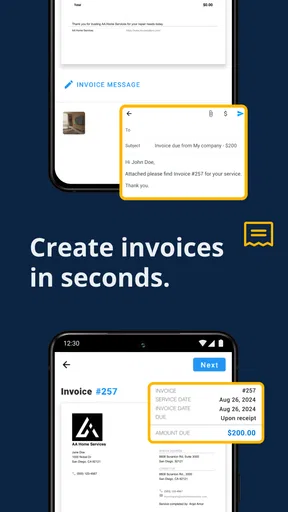
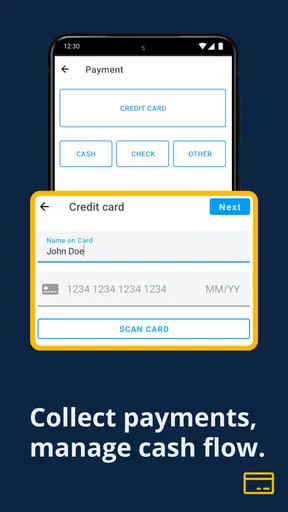
- Built-in invoicing and payment options can speed up billing after completed work.
- Customer notifications make it easier to share arrival times and appointment updates.
- Photo and note features help document work performed at each service location.
- Team dashboards provide visibility into job progress and technician activity.
Limitations of Housecall Pro: Field Service
- Many advanced features require a paid subscription or higher pricing tier.
- The broad feature set can feel overwhelming for small teams or occasional users.
- Some workflows may require reliable internet access while technicians are onsite.
- Payment processing and other add-ons may introduce additional business costs.
- Customization options may not fully match every company's existing workflow.
Similar Picks in This Category
View All
LinkedIn: Community & Network
LinkedIn3.8

Zoom Workplace
zoom.com4.1

Microsoft Teams
Microsoft Corporation4.6

Meta Business Suite
Meta Platforms, Inc.4.6

Webex Meetings
Cisco Systems, Inc.4.5

TeamViewer Remote Control
TeamViewer4.4
Frequently Asked Questions
What is Housecall Pro: Field Service used for?
Housecall Pro: Field Service is a business management app designed for home-service professionals such as plumbers, electricians, HVAC technicians, cleaners, and landscapers. It helps teams organize appointments, manage customer information, create estimates and invoices, accept payments, communicate with clients, and track jobs from a mobile device. Its usefulness depends on having an active Housecall Pro account and a service business that needs centralized scheduling and workflow tools.
Do I need a Housecall Pro account to use the app?
Yes, the app is primarily intended for businesses and field workers who are already using the Housecall Pro platform. Installation alone does not provide full access to its features. You generally need valid account credentials supplied by your company or created through an appropriate Housecall Pro plan. Employees may receive limited permissions based on their role, so available tools can differ between an administrator, office dispatcher, and field technician.
Can Housecall Pro: Field Service work without an internet connection?
The application is built around cloud-based business data, so an internet connection is important for synchronizing schedules, customer records, job updates, messages, estimates, and payments. Some information or actions may remain available temporarily when connectivity is weak, but offline functionality should not be treated as unlimited. Technicians working in areas with poor coverage should confirm that important job details and updates have synchronized before going offline.
What features are available for technicians and service companies?
Depending on the subscription and user permissions, Housecall Pro can support job scheduling, dispatching, customer profiles, estimates, invoices, payment collection, appointment notifications, internal notes, photo documentation, and communication between office staff and technicians. The app is especially helpful for keeping job information in one place while traveling between appointments. However, advanced features, payment tools, integrations, and automation may require specific plans or additional setup.
Is Housecall Pro: Field Service free to download and use?
The app may be available to download without an upfront charge, but that does not necessarily mean the complete service is free. Housecall Pro is a subscription-based business platform, and access to its tools is typically connected to a company plan, trial, or account arrangement. Pricing, included features, user limits, and payment-processing costs can change, so businesses should review the current terms before subscribing or relying on the app for daily operations.
